
Formatting pretty hex keys from template text files
I’m really fascinated with layout and production of DnD adventures, however I don’t have the patience to sit down and fiddle in Word or Affinity Publisher. Instead I want to write my hex keys and descriptions in a standard template and get the computer to make it look attractive and lay everything out in a nice PDF document for me. For example my hex descriptions often follow the following template:
Hex Title
- Some descriptive bullet points
- Additional descriptions
Hidden:
- Something only found by searching
I want to be able to write all my hex descriptions in something like the above template in plaintext, then compile them all into a well formatted document. What advantages does this bring rather than just writing it in a normal word processor?
- Most often inspiration strikes me on the fly, and I want to write my ideas down into my phone using a basic text editor. This lets me write directly into my template file rather than writing down onto a notepad and then transcribing into a word processor later.
- Hexes are easily rearranged or imported. To rearrange entire hex decscriptions in the document we just change the order they’re included and the computer does the rest for us! We could even build up a large “library” of hexes and create new hex crawls by mixing and matching a bunch of different hexes.
- Hexes could be crowdsourced by a group, like from a forum. These standard format hexes could quickly be turned into an adventure!
To create this workflow from text template files to a formatted PDF document we need a few components:
- Processor to create the document: I’m using LaTeX. LaTeX is a documentation preperation system that uses document markup rather than wysiwyg (like Microsoft Word).
- A format to write the templates in: The templates need to be written in a format that can be read by a programming language. I’m using writing these in configuration files in YAML format. I like YAML as it’s human readable and easy for programming languages to parse.
- Something to convert the template into the Processor Language: In this case I want to convert my YAML templates into LaTeX. I’m using the jinja2 templating engine with Python because its what I’m familiar with.
The first thing we want to do is to convert the hex descriptions above into the YAML template. Below you can see a hex description I’ve written that roughly matches my below template.
hex:
  name: Middle Bridge
  description:
    - Two cart wide stone bridge, charred and crumbing but still standing
    - Two trolls standing guard, demanding toll of 2c each to cross - easily confused
  hidden:
    - Underneath bridge on west side, troll encampment. 1d6 trolls sleeping and dangling a gagged halfling over boiling pot.
    - Cave crudely excavated into western bridge wall. contains 100c and a keg of dwarvern ale (bravery for 24 hours).
We can see that even though it has been converted to YAML it’s still readable. I would write a bunch of these hex descriptions and put each one in a seperate file.
Next we need to convert these descriptions to LaTeX. The converter for this can be found on my github. This code includes the required hex description files, converts them into LaTeX and then compiles the LaTeX to a pdf.
You may notice that I’ve included each hex statically (rather than just including all files in my hex directory). This is so I can determine the order of the hexes in the document and reorder them at any time. In the final document they will be automatically numbered and arranged in the order they were included.
After running this code we can have a look at the .tex file produced. This contains the LaTeX typesetting used to create the PDF. We can see that the hex descriptions are in this file and have been converted to LaTeX.
Finally we can have a look at the PDF document produced by LaTeX. I’m using a template to match old school D&D adventures. If you want to try out my script you will need to use this template.
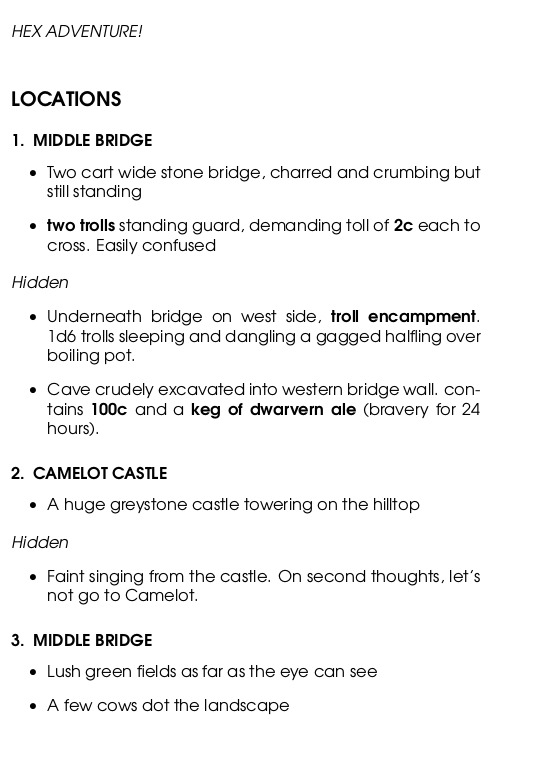
Looks good!
If I was looking to publish an adventure in this style I’m sure the LaTeX markup would need some cleanup to get it in a proffessional-ish manner. However the process above should be sufficient for my home games or fast prototyping.
I’m looking to extend this to allow for writing an entire adventure. For example having a template for encounter tables and monster stats. What if there was a file for troll stats in one game system (eg OSE) and a file for troll stats in another (eg. ItO)? We could have a modular system where to create the adventure with different stats we just import the files for the monster stats for the system that’s being played.
Hopefully my ramblings were interesting. Let me know if you want to hear more and are interested in the extensions of this topic.